Watch the walkthrough: How to Use TWAP Orders on Ouinex
What a TWAP order is
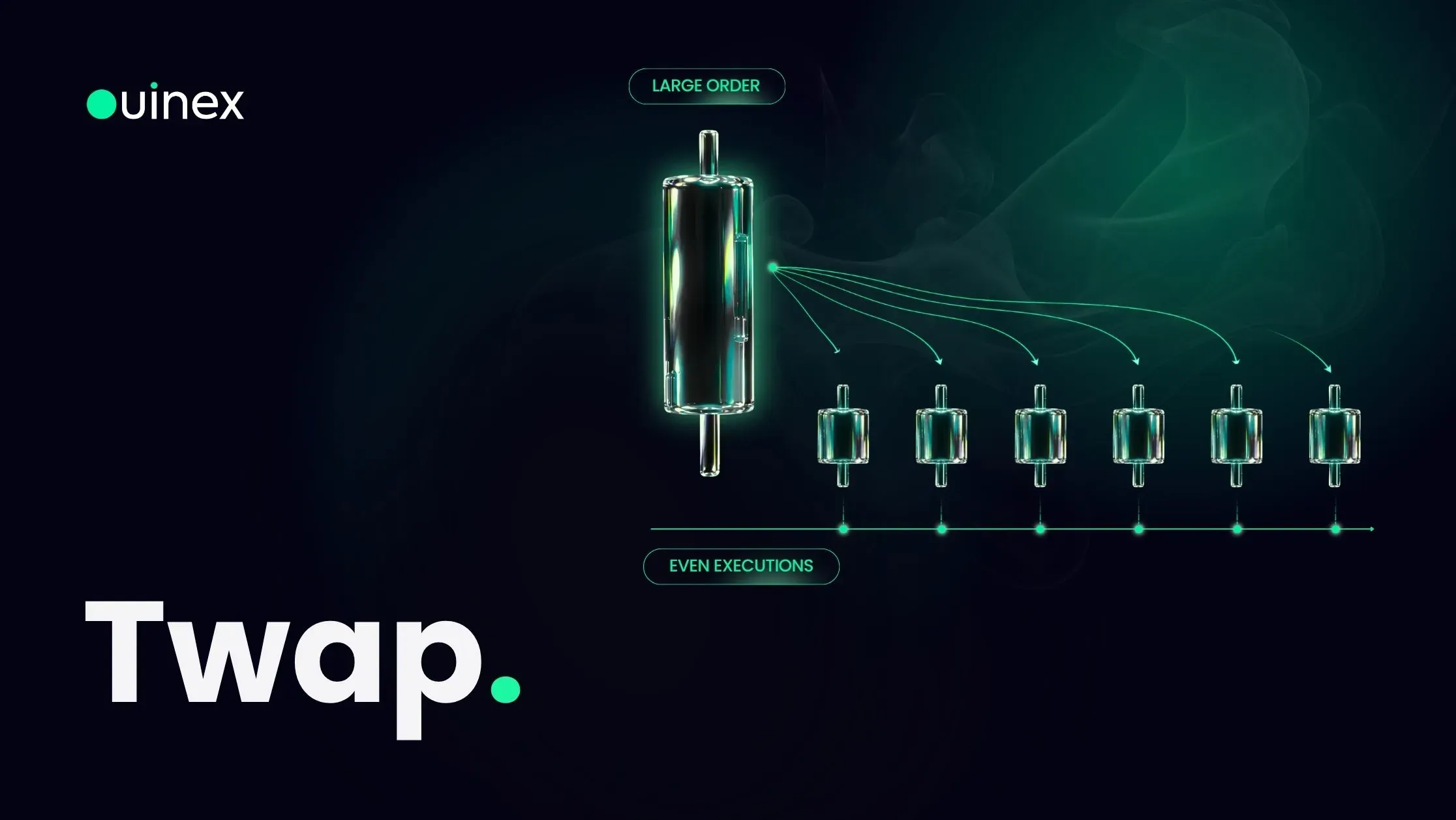
A TWAP order is an execution algorithm, not a bet on direction. You have already decided you want to be long or short; TWAP decides how that size arrives in the market.
You give it three things: a total quantity, a running time, and a frequency. It divides the quantity by the number of intervals and releases one slice per interval until the order is complete. A 15-minute order at a 5-minute frequency executes in three even slices. A 4-hour order at a 10-minute frequency executes in twenty-four.
Your resulting average entry is, near enough, the time-weighted average price of the instrument across that window, hence the name. You are deliberately giving up the chance of a great single fill in exchange for not getting a terrible one.
Why splitting an order changes your fill price
Two separate things happen when a large order arrives all at once.
The mechanical one is slippage. The liquidity available at any given price is finite, so a large order eats further into it and your average fill comes out worse. Ouinex shows an estimate of the slippage before you place an order, and lets you set the maximum negative slippage you will accept.
The informational one is that other traders can see your order sitting there. This is where it is worth being precise about how Ouinex works, because it is not the same as most venues. Ouinex runs a no-CLOB execution model. There is an order book, and traders can see it, you see each other's resting orders. What market makers cannot do is read it. On a conventional central limit order book a market maker sees the full ledger and can position against the size sitting in it. On Ouinex they do not have that view, so the participants who can see your resting order are other traders, not a counterparty holding a structural information advantage over you.
TWAP works on both problems at once. Each slice is small enough to take less liquidity, and small enough that it does not announce your full size to the people watching the book.
The three settings that decide your result
Running time is the window, anywhere from 5 minutes to 24 hours, with shortcuts at 10 minutes, 30 minutes, 1 hour and 4 hours. Longer windows mean smaller, less conspicuous slices and less slippage per fill, and expose you to more price drift. That is the whole trade-off, and there is no setting that avoids it.
Frequency is how often a slice fires, every 5 minutes, say. Frequency and running time together fix your slice count, and slice count is what determines whether each piece is genuinely small relative to normal flow. Twelve slices that each fill without moving the price is the target. Three slices that each drag your average has achieved nothing.
Execution strategy is either Uniform or Randomised. Uniform sends identical size at every interval, spreading your total evenly across the whole period. Randomised varies the size of each slice at random within an allowed range, so the pattern of your execution is harder to read. A perfectly regular order every five minutes for two hours is itself a signature to anyone watching the book; Randomised removes it.
You also choose whether each slice fills as a market or a limit order. Market slices complete on schedule and pay the spread. Limit slices control the price and may not fill, which means your total quantity may not complete inside the window.
When TWAP is the wrong tool
TWAP spreads you across time, and time is directional risk. If the market runs away from you during the window, every remaining slice fills worse than the first. The algorithm does not know this is happening and will not stop.
So it is the wrong choice when the move is the reason you are trading. Entering on a breakout, reacting to an economic release, or getting out of a position that is going badly, all of those want immediacy, and a market order is the honest answer. TWAP earns its keep when your size is large relative to available liquidity and your timing is flexible. When timing is the edge, spreading it out destroys the edge.
The other case to avoid is thin markets. A TWAP running through an illiquid session does not improve anything; it just spends an hour paying a wide bid-ask spread over and over. Check the session before you set the window, trading hours differ by asset class, and the same instrument can be deep at 14:00 and empty at 03:00.
Setting up a TWAP order on Ouinex
TWAP sits in the order type menu at the top of the trade form, alongside Market and Limit.
- Choose Long or Short.
- Enter your Total Quantity, the full size to execute, before it is divided.
- Set your leverage.
- Set the Running Time, from 5 minutes to 24 hours.
- Choose the Frequency, how often a slice is released.
- Pick Market or Limit for the individual slices.
- Choose Uniform or Randomised for the execution strategy.
- Confirm.
Because it is an algorithmic order, it does not appear in Open Positions while it runs. It lives in the Algo tab at the bottom of the screen, which shows the contract, the side, the order type, progress as Filled/Total, the status and the frequency. From there you can view the details, pause the order, or cancel it outright.
The pause is worth knowing about before you need it. If the market moves hard mid-window, pausing stops the remaining slices without cancelling the fills you already have, which is the difference between managing a half-filled TWAP and being stuck with one.
FAQ
What does TWAP stand for? Time-Weighted Average Price. It describes both the algorithm and the benchmark: the order aims to fill you at roughly the average price of the instrument across the execution window, weighted evenly by time rather than by volume.
What is the difference between TWAP and VWAP? TWAP weights every moment in the window equally. VWAP, Volume-Weighted Average Price, weights by how much actually traded, so it sends more size when the market is busy. VWAP usually gets a better result in markets with a predictable volume profile; TWAP is simpler, more predictable, and does not need a volume forecast to work. Ouinex offers TWAP.
Can I cancel a TWAP order once it has started? Yes. Open the Algo tab and cancel it. Slices that have already executed stay executed, you keep whatever position has been built so far, and the unfilled remainder is dropped. You can also pause instead of cancelling, which halts the schedule without discarding the order.
Does a TWAP order get me a better price? Not by itself. It reduces the slippage your own size creates and keeps your full size off the book, both of which are real costs on a large order. It does nothing about the direction of the market during the window, and if price moves against you the later slices fill worse. On small orders that already fill with negligible slippage, TWAP adds spread cost and delay for no benefit.
What is the minimum TWAP duration on Ouinex? Five minutes. The maximum is 24 hours, with preset shortcuts at 10 minutes, 30 minutes, 1 hour and 4 hours.
The bottom line
TWAP solves one problem well: a large order that both moves the price and advertises itself. It does that by trading immediacy for a better average, which is a genuine trade, not a free upgrade. Size the slices small enough that each one fills cleanly, and keep the Algo tab open so you can pause if the market makes your original plan obsolete. If you want to see how it behaves before committing real size, run one on a demo account first, a TWAP is one of the few order types where watching it work is more instructive than reading about it. It is available now on Ouinex derivatives, alongside the rest of the algorithmic order set.