SpaceX has completed over 500 Falcon missions and more than 400 successful booster landings, a reusability record no other launch company is close to matching. On June 12, 2026, SpaceX went public on the Nasdaq under ticker SPCX, closing its first day at $161 and reaching a market cap above $2 trillion. You can now buy SPCX shares through a standard brokerage. But you can also trade it differently: directly on Ouinex, using a SpaceX CFD with up to 10x leverage and the ability to go long or short.
This guide walks you through exactly what that means and how to do it. By the end, you will know what a SpaceX CFD is, how to find it on the platform, what leverage does to your position, and what risk management basics you need before placing your first trade.
Risk Notice: CFD trading involves significant risk. Trading SpaceX CFDs with up to 10x leverage amplifies both gains and losses. You may lose all or part of your invested capital. Ensure you understand the risks before trading. |
What Is a SpaceX CFD?
A CFD (Contract for Difference) lets you take a position on the price movement of an asset without owning it. When you trade a SpaceX CFD on Ouinex, you are not buying or holding SPCX shares. You are entering a contract that pays you the difference in price between when you open the trade and when you close it.
If SpaceX's price goes up and you bet on that direction (called going long), you profit. If it goes down and you bet on that direction (called going short), you profit. If the price moves against your position in either case, you incur a loss.
CFDs are a form of derivative instrument. The how CFDs and leverage work covers CFDs, leverage, margin, and related terms in plain language.
SPCX Shares vs SpaceX CFDs: What Is the Difference?
SpaceX is now publicly traded as SPCX on the Nasdaq. Buying SPCX shares through a standard brokerage is straightforward. But a SpaceX CFD on Ouinex offers three things a standard stock purchase does not.
Leverage. CFDs let you control a position worth more than the capital you deposit. On Ouinex, SpaceX CFDs carry up to 10x leverage, meaning a $1,000 deposit gives you $10,000 of SPCX exposure. Buying shares directly gives you no leverage.
Short access. CFDs let you go short, meaning you can profit if SPCX falls. A standard stock buy order only allows you to go long.
No brokerage required. To buy SPCX shares, you need a Nasdaq-compatible brokerage account. If you already trade on Ouinex, SpaceX exposure is available through your existing account via the stock CFD section.
For background on what is driving SPCX price movement right now, see our SpaceX CFDs overview on Ouinex.
How SpaceX CFD Pricing Works on Ouinex
The SpaceX CFD on Ouinex tracks the live SPCX share price on Nasdaq. As with all stock CFDs, you are not buying shares. You are taking a leveraged position on the price direction of the underlying stock, based on real-time market data. The spread between the bid and ask price is your primary trading cost.
How to Find SpaceX on Ouinex: Step by Step
Follow these steps to locate the SpaceX CFD and prepare your trade.
Step 1: Log In to Your Ouinex Account
Go to ouinex.com and sign in. If you do not have an account yet, registration takes a few minutes. You will need to fund your account before placing your first trade or Try Trading SPCX on a demo account. Check the deposits section on the platform for the current minimum deposit requirement before registering.
Step 2: Navigate to Derivatives
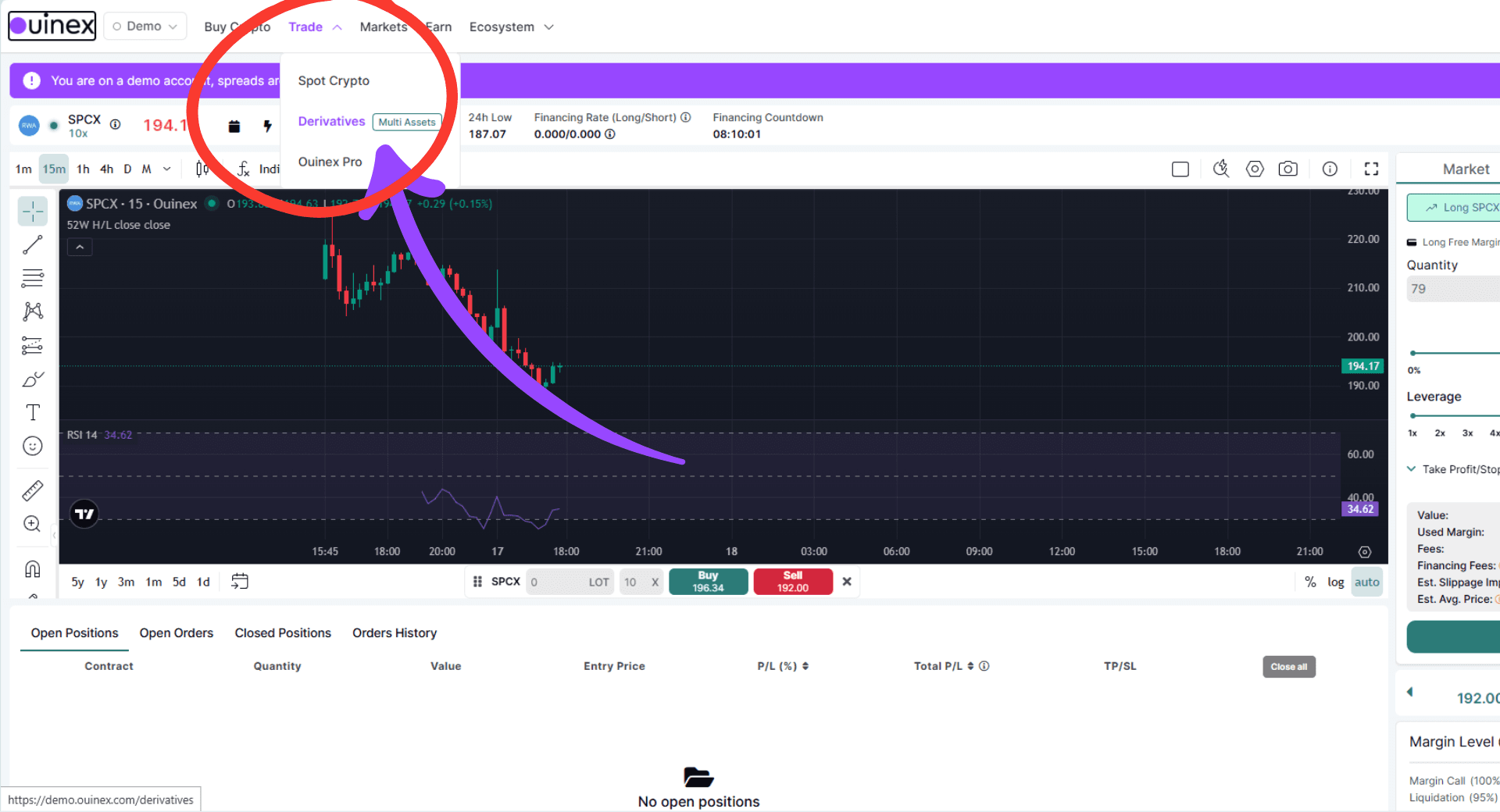
From the main menu, select Derivatives. This is where all CFD products live, including forex, commodities, stock indices, and stocks.
Step 3: Select Stocks
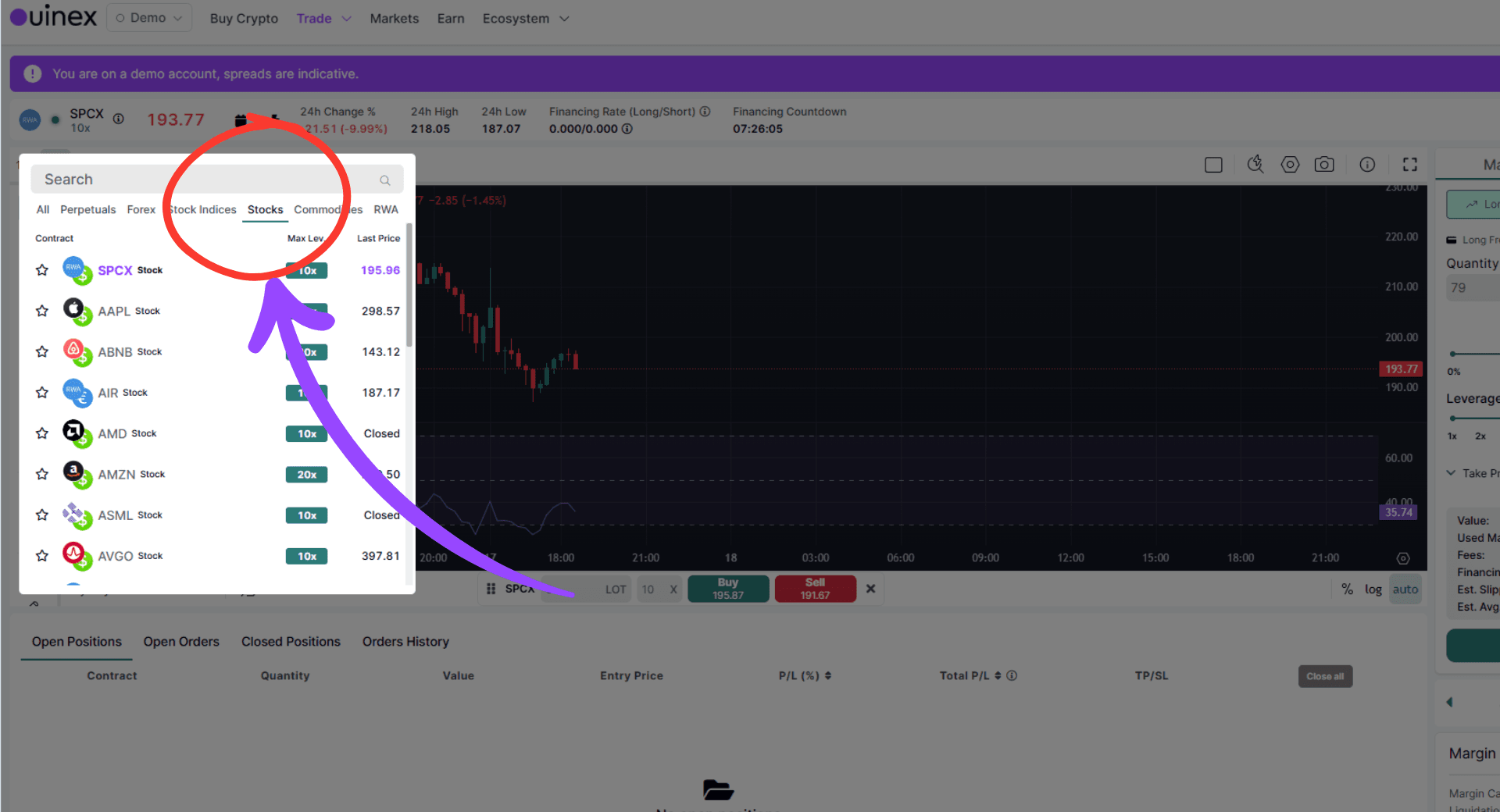
Inside Derivatives, choose the Stocks section. This is where individual company CFDs are listed, including SPCX.
Step 4: Search for SpaceX
Use the search bar to find SpaceX by name or ticker. Once you find it, click on the instrument to open the trading panel.
Step 5: Review the Current Price and Spread
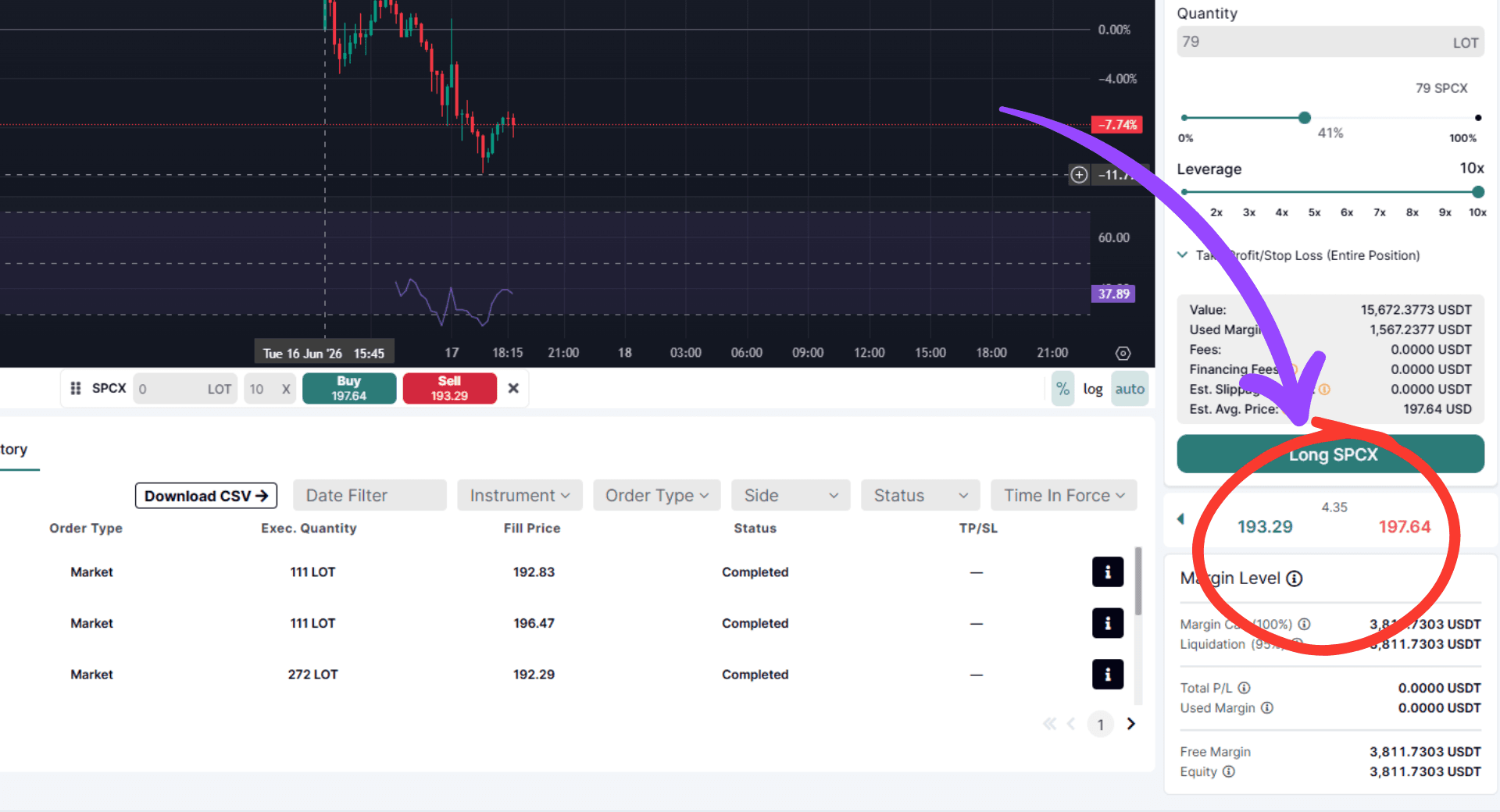
Before placing a trade, check the current bid/ask price and the spread (the difference between the two). The spread is your first cost. Factor it into your trade planning.
Understanding Leverage Up to 10x
SpaceX CFDs on Ouinex are available with up to 10x leverage. This is the single most important concept to understand before you trade, especially as a beginner.
Leverage means you can control a position worth more than the capital you deposit. With 10x leverage, a $100 deposit gives you $1,000 of market exposure.
Here is what that means in practice. SPCX is priced at $161 (its June 12, 2026 close). You want to buy 10 units ($1,610 of exposure). Without leverage, you need $1,610. With 10x leverage, you only need $161 in margin to open that position.
Now the important part: if SpaceX moves 10% in your favour, your $161 margin earns $161. That is a 100% return on capital. If SpaceX moves 10% against you, your $161 is gone. You would owe more than your initial deposit without a stop loss.
Leverage amplifies both sides equally. Never use maximum leverage as a default. Start with lower leverage settings until you understand how a position responds to price moves.
Risk Notice: With 10x leverage, a 10% adverse move in SPCX results in a 100% loss of your margin deposit. Losses can exceed your initial capital if no stop loss is set. Ensure you fully understand leveraged trading before opening a position. |
Placing Your First SpaceX Trade
Once you have found SpaceX in the Stocks section and reviewed the price, here is how to set up your trade.
Step 6: Choose Your Direction
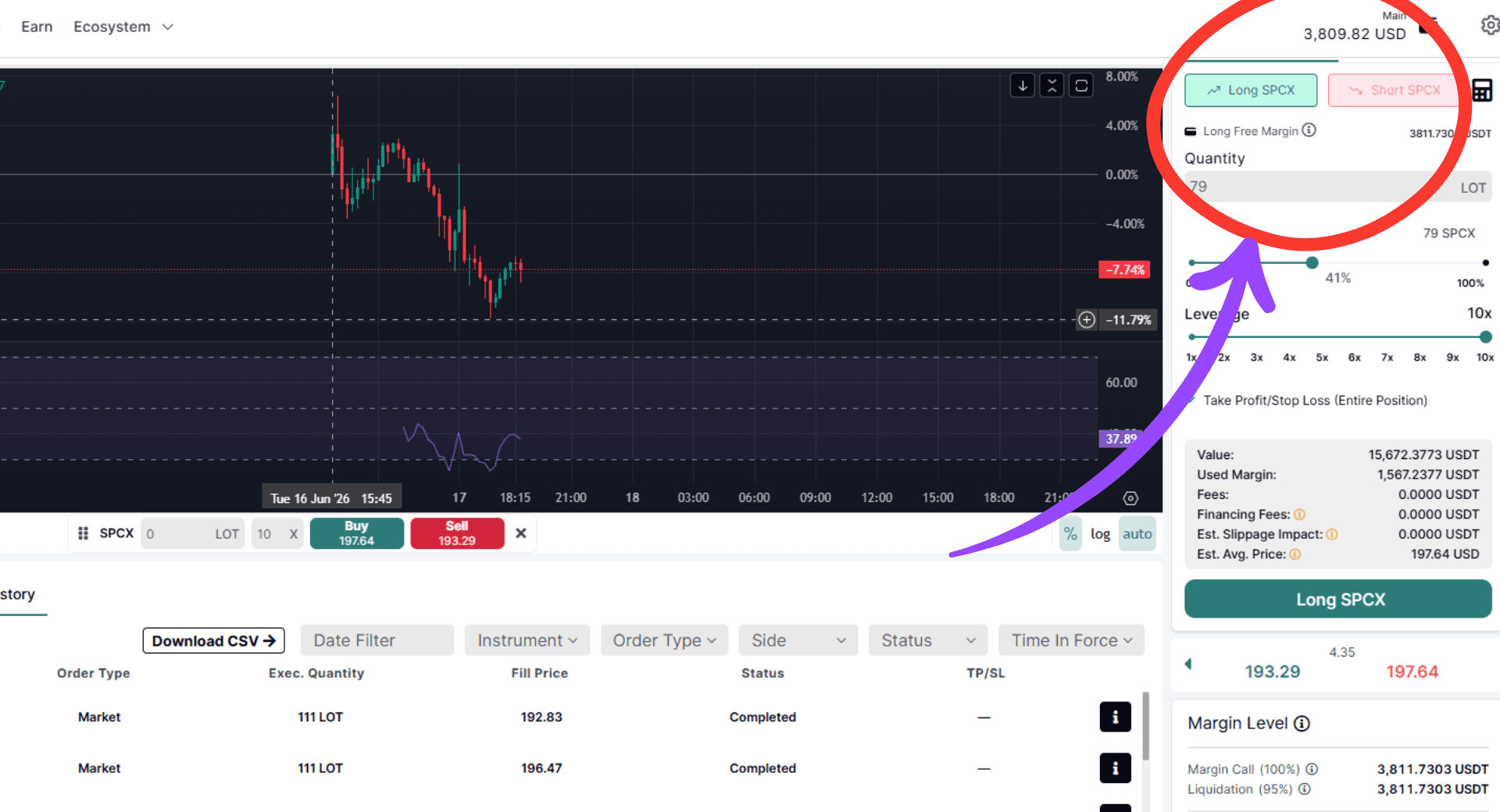
Select Long if you believe SPCX will rise, or Short if you believe it will fall. Your direction is the core of your trade thesis.
Step 7: Set Your Position Size
Decide how much exposure you want and calculate your required margin. Your margin and exposure both display automatically in the order panel. Start with the smallest position the platform allows until you have traded the instrument at least a few times.
Step 8: Set a Stop Loss
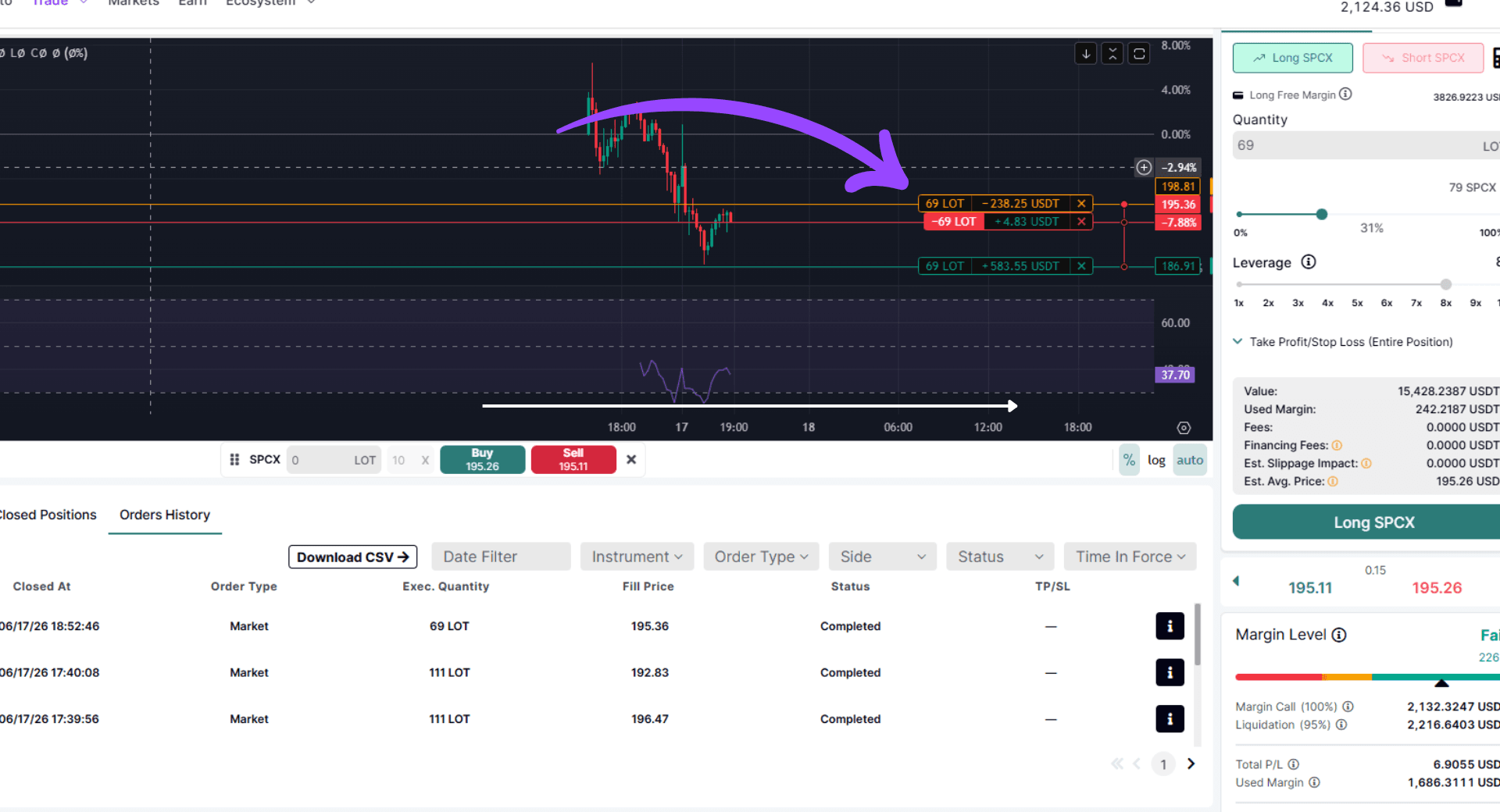
A stop loss closes your trade automatically if the price reaches a level you define. This is your built-in protection against a trade moving heavily against you. Setting a stop loss is not optional for beginners. It is how you define the maximum you are willing to lose before you even open the trade.
Step 9: Set a Take Profit (Optional)
A take profit closes your trade automatically when the price reaches your target. Useful if you want to lock in gains without monitoring the position constantly.
Step 10: Monitor The Trade
Review all parameters before confirming. Plus, Once the trade is live, you can monitor it in your open positions panel.
Risk Management Before You Start
SpaceX is a high-profile, high-volatility asset. Its price can move sharply on news events: Starship test flights, earnings announcements from the Starlink division, satellite partnership deals, and government contract decisions all create price spikes. This is what makes it an interesting CFD. It is also what makes it one of the riskier ones.
Three rules apply to every beginner trading SpaceX CFDs.
- Only risk what you can afford to lose entirely. CFDs can result in losses that exceed your initial deposit if you do not use a stop loss. Always set one.
- Size your position relative to your total capital. As a starting point, do not risk more than 1 to 2 percent of your total trading capital on a single position. If your account holds $500, your risk per trade should be $5 to $10.
- Understand the catalyst you are trading. Do not open a SpaceX position without a reason for why the price should move in your direction. A Starship launch tomorrow is a catalyst. "I feel like it will go up" is not a thesis.
Overnight Financing: The Cost Beginners Miss
CFD positions held open past the daily cut-off incur an overnight financing charge, calculated as a daily percentage of the total position value. On a 10x leveraged position, this fee applies to the full exposure, not just the margin you deposited. A $500 margin controlling $10,000 of SPCX exposure will accrue an overnight charge on the $10,000.
For short-term trades opened and closed within the same day, the charge does not apply. For positions held over several days or weeks, it becomes a meaningful cost that eats into your returns even when the price moves in your favour.
Check the instrument details panel on Ouinex before opening a position to see the applicable overnight rate. For more on how Ouinex handles margin and account protections, see the derivatives safety of assets page.
Frequently Asked Questions
Can I trade SpaceX on Ouinex without owning SPCX shares?
Yes. SpaceX on Ouinex is a CFD, which means you take a position on its price direction without buying or holding the underlying SPCX shares. You never own a stake in SpaceX.
What is the maximum leverage available for SpaceX CFDs?
SpaceX CFDs on Ouinex are available with up to 10x leverage. This means you can open a position 10 times larger than the margin you deposit. Higher leverage increases both your potential gains and your potential losses proportionally.
Can I short SpaceX on Ouinex?
Yes. CFDs allow you to go both long (betting the price rises) and short (betting the price falls). If you believe SPCX is overvalued following a negative catalyst, you can take a short position and profit if your analysis is correct.
Is a stop loss mandatory when trading SpaceX CFDs?
Ouinex does not force you to set a stop loss, but it is strongly recommended, especially for beginners and volatile assets like SpaceX. Without a stop loss, a sharp move against your position can result in losses that exceed your initial margin deposit.
What is overnight financing and does it apply to SpaceX CFDs?
Yes. Any SpaceX CFD position held open past the daily cut-off incurs an overnight financing charge based on the total position value, not just your margin. Check the instrument panel on Ouinex for the applicable rate before opening a position you plan to hold for more than one day.
What is the difference between buying SPCX shares and trading a SpaceX CFD?
Buying SPCX requires a Nasdaq-compatible brokerage account and only lets you go long with no leverage. A SpaceX CFD on Ouinex lets you go long or short with up to 10x leverage through your existing Ouinex account.
Where can I find SpaceX in the Ouinex platform?
Go to Derivatives, then Stocks. Search for SpaceX by name or ticker (SPCX). The instrument will appear with its current bid/ask price, available leverage, and an option to open a long or short position.
What is the minimum deposit to start trading SpaceX CFDs on Ouinex?
The minimum deposit on Ouinex depends on your account type and chosen payment method. Check the deposits and funding section of the platform for the current minimum before registering. Once your account is funded, you can access SpaceX and the full range of stock CFDs immediately.
Start Your First SpaceX CFD Trade
SpaceX is one of the most closely watched stocks in the world right now. SPCX has been live on Nasdaq for less than a week and the range of outcomes from here remains wide.
You now know what a SpaceX CFD is, how to find it on Ouinex, what leverage means for your position, what overnight financing costs to expect, and what risk management basics you need before opening a trade.
Access SpaceX and the full range of stock CFDs on the Ouinex derivatives platform.
Risk Warning: CFD trading involves significant risk and is not suitable for all investors. You may lose all or part of your invested capital, and your investment does not benefit from any form of financial protection. Leveraged products amplify both gains and losses. Past price movements are not a reliable indicator of future results. Ensure you fully understand the risks before trading. |
Sources
1. SpaceX IPO takeaways: SPCX closes at $161, jumping 19% after record debut — CNBC
2. SpaceX completes 400th Falcon booster landing on a drone ship — Spaceflight Now
3. Contract for Difference (CFD) — Corporate Finance Institute
4. CFD Leverage and Margin Explained — FOREX.com Trading Academy
5. CFD Swap Rates and Overnight Financing Explained — ActivTrades