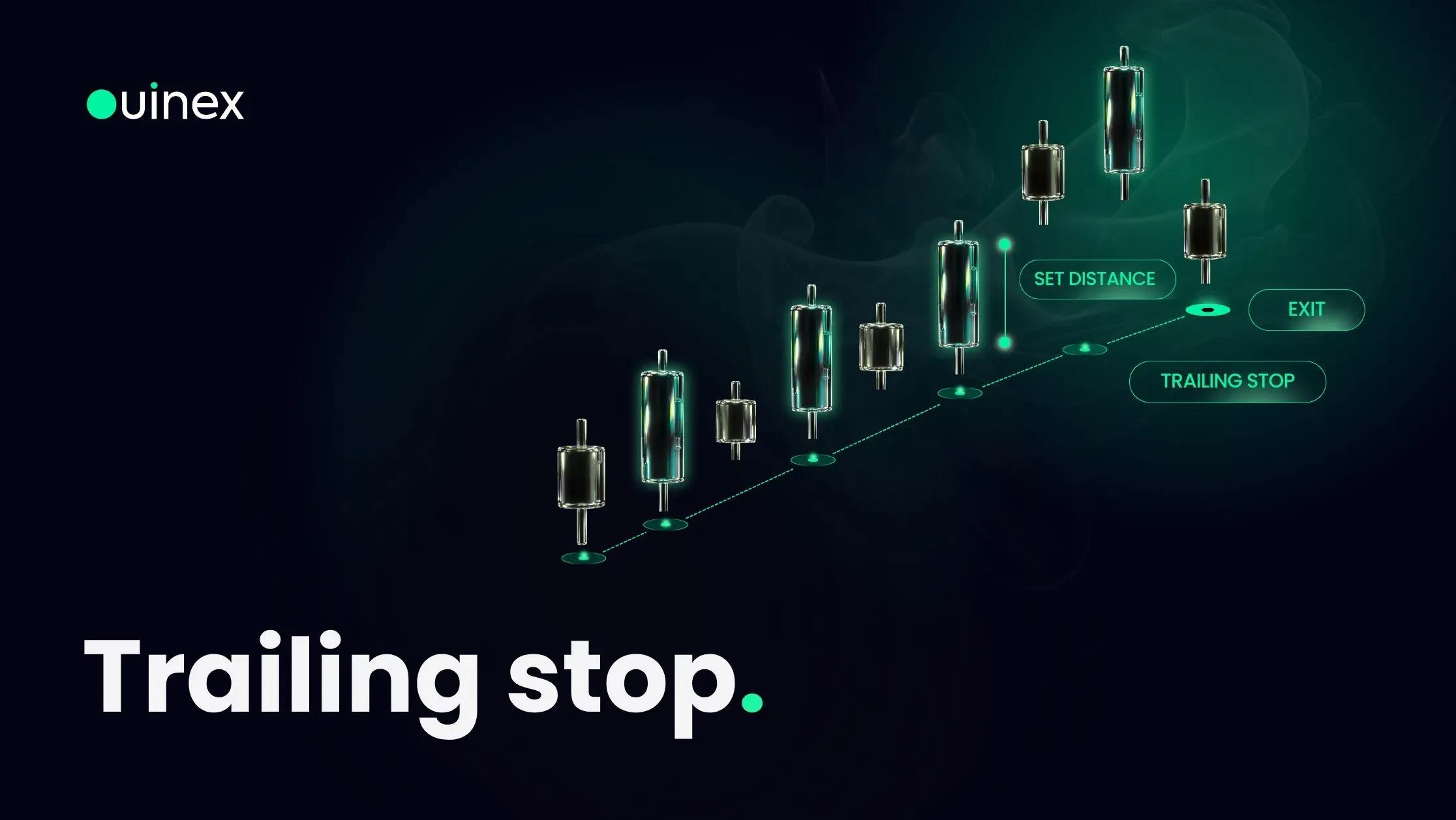
That one-way ratchet is the whole idea, and it solves a problem most traders recognise: taking profit too early because watching an open winner is uncomfortable, or too late because moving the stop by hand means deciding, repeatedly, under pressure. Trailing stops are now available on Ouinex derivatives both as a standalone order and inside the advanced take profit and stop loss configuration.
Watch the walkthrough: How to Use Trailing Stop Orders on Ouinex
How the trail actually works
The mechanism has three moving parts, and only one of them moves.
The best price is the highest price reached since the order became active on a long, or the lowest on a short. Ouinex tracks this for you and shows it in the Algo tab as the order runs.
The callback is the distance you set. It is measured from that best price, not from your entry and not from the current price.
The stop level is best price minus the callback on a long, or best price plus the callback on a short. Every time the best price improves, the stop level is recalculated. When the best price does not improve, nothing happens.
A worked example. You go long at 100 with a 2.00 callback distance. The stop sits at 98. Price runs to 105, so best price is 105 and the stop moves to 103. Price falls back to 103.5, the stop does not move, because 105 is still the best price. Price recovers to 108, and the stop follows to 106. Price then drops to 106 and your position closes there.
Notice what happened: you entered at 100, the market reached 108, and you exited at 106. The trail never gives you the top. It is designed to give you most of a move without requiring you to predict where the move ends.
Choosing the callback distance
This is the only decision that matters, and it is a genuine trade-off with no correct answer.
Too tight and ordinary noise closes you out. Every instrument has a normal amount of back-and-forth within a trend; set the callback inside that range and you will be stopped out on a routine pullback, watch the move continue without you, and conclude that trailing stops do not work. They do, the setting was wrong.
Too wide and you give back a large share of the gain before the exit triggers. A 10% callback on a move that only ran 12% is barely better than no stop at all.
The useful reference point is the instrument's typical pullback size on the timeframe you are trading. A trend that routinely retraces 2% before continuing needs a callback wider than 2%, or you are betting against the instrument's own rhythm. Average True Range is the standard way to measure this, and it is the reason most traders set the callback as a multiple of ATR rather than as a round number.
Ouinex lets you express the callback two ways. Callback Distance is a fixed amount in USD. Callback Rate is a percentage. Percentage travels better across instruments and across price levels; a fixed amount is easier to reason about when you are trading one instrument at one size all day.
The activation price
By default the trail starts immediately. The optional Activation Price delays it until the market reaches a level you choose.
This is more useful than it first appears. Trailing from the moment you enter means the trail is active during the part of the trade where you have no profit to protect, and a callback that is sensible for a position that is 3% in front is often too tight for one that has just been opened. Setting an activation price a reasonable distance above your entry on a long means the stop only starts following once the trade is genuinely working, and your initial risk is handled by a normal stop loss instead.
Leave it off and the trail begins straight away. Turn it on, and the order sits inactive until the price you named is reached.
Two ways to use one on Ouinex
As a standalone order. Trailing Stop appears in the order type menu at the top of the trade form. Choose Long or Short, enter your quantity, set your leverage, then pick Callback Distance or Callback Rate from the dropdown and enter the value. Add an activation price if you want one, and confirm.
Attached to a position. Open the Advanced Config in the TP/SL section of the trade form and enable Advanced SL. Trailing Stop is one of three presets there, alongside Break-Even and Stop-Win. This route is the better one when the trailing stop is the exit plan for a position you are opening now, because it goes on at the same moment as the entry.
Either way, as an algorithmic order it lives in the Algo tab at the bottom of the screen. That tab shows the contract, side, quantity, callback value, activation price, the best price reached so far, and the status. The best-price field is the one to watch. It tells you exactly where the trail is measuring from, which is the only number you need to work out where the stop currently sits.
What a trailing stop does not do
It does not guarantee your exit price. A trailing stop triggers at your level and then closes the position at the next available price. In a fast market, a gap, or a weekend reopen, that price can sit some distance from the trigger. The trail controls when you exit, not at what price you are filled.
It also does not improve a bad trade. A trailing stop on a position sized too large is still a position sized too large, and the trail will happily follow a move that was never worth taking. It is an exit tool, and exits cannot fix entries.
FAQ
What is a trailing stop order? A stop order whose trigger level follows the market in the profitable direction and stays fixed when the market moves against the position. You set a callback distance or percentage; the stop maintains that gap behind the best price reached, and closes the position if the market retraces by that amount.
What is a good trailing stop percentage? There is no universal figure, because it depends on how much the instrument moves in normal conditions. The working rule is that the callback must be wider than the instrument's routine pullback on your timeframe, or ordinary noise will close you out. Traders commonly size it as a multiple of ATR rather than picking a round percentage.
Does a trailing stop move down if the price falls? No, and this is the defining feature. On a long position the stop only ever moves up. Once price sets a new high the stop follows; if price then falls, the stop stays where it is. On a short position the same applies in reverse, the stop only ever moves down.
Can I use a trailing stop and a take profit together? Yes. Inside the advanced TP/SL configuration you can set take profit levels and attach a trailing stop as the advanced stop strategy on the same position. The take profit closes size at your targets; the trail manages whatever remains.
What is the difference between a trailing stop and a break-even stop? A break-even stop moves once, to your entry price, when a trigger you set is reached, after that it does not move again. A trailing stop keeps moving for as long as the trade keeps improving. Break-even removes the risk of a loss; trailing tries to capture more of the gain.
The bottom line
A trailing stop turns "when do I take profit?" into a single decision made once, before the pressure starts. Set the callback wider than the instrument's normal pullback, use an activation price so the trail only engages when the trade is actually working, and accept that you will never exit at the high. That is the cost of not having to guess where the high is. Watch the best-price field in the Algo tab and you will always know where your stop sits. Trailing stops are available now as a standalone order type and inside the advanced TP/SL config on Ouinex derivatives.